Saturday, October 4, 2014

AChep's HeadUp

What does AChep's HeadsUp do more than embedded CM11 HeadsUp notifications?


Not much at first, the goal is the same : display notifications in a popup so that user can read them without dragging notification menu.


What are the CM11 feature limits?

  • No dark/light theme
  • No timeout settings
  • Touch outside will dismiss without any possibility for user to change that.                 


What does AChep's HeadsUp better?

  • Dark/light theme
  • User configurable timeout before autodismiss
  • Minimum priority needed by a notification to access HeadsUp
  • Hide on Touch outside can be (en/dis)abled by user
  • Blacklist capabilities (both prevent notifications in specified app AND prevent specified apps from getting access to HeadsUp notification


Some Screenshots


Monday, September 29, 2014

Xposed and Moto G (2)

Xposed & Moto G

Here are a few Xposed modules i currently use on my device [XT1032] (in addition to CM11) : 

Simply click on the links to get more about these modules


For another device i had to set up [XT1039, MotoG LTE] for 'standard End-User' in addition to Motorola Stock ROM : 


Wednesday, September 24, 2014

Quick Review (part2) : Hybrid armor case for MotoG

Quick Review (part2) : Hybrid armor case for MotoG


A while ago (middle of june 2014) i had bought a 'heavy duty' case for my Falcon and made an 'out-of-the-box' review. It is now time to see how it survived to life:


As said in previous review, i didn't use kickstand and pocket clip features that i simply removed.


Device protection

The device fell on the floor a few times without phone destruction (the added thickness above screen protected it, same for camera lens and other vital parts).

Corners of the cases obviously got some little scratches : 

Looks like the rubber part perfectly absorbs shocks and preserves the device.
I didn't pay attention to my falcon at all, being confident with the extra-protection added by the case.


Wear and tear

Blue-Jeans are quite abrasive stuff, so they produce some scratches in the angles


Pretty descent for a 3 month heavy usage (the case have never been removed from device until today)


Dust
Rubber loves dust ...

So here is the inside : 
Less dust stuck there than expected.


And the device??

I can't say it looks like a brand new device, but there are no major flaws    
Funny fact: 
The model number is molded in the rubber part : 

Looks like it is reported on the device's back cover now ...


Conclusion : 
A great case that does the job it is meant to.

  • Efficient: performance and low cost. 
  • Resistant: not much wear and tear despite quite hard conditions
  • Little flaws that had already been pointed out in part1, but are acceptable for the price.
There might be a part 3 in a few months to follow this case ageing...

Saturday, August 30, 2014

Why 4GB of RAM is too few for little dev

After a long struggle to get OpenJDK7, the AndroidSDK, Android Studio and git all working together ...

https://github.com/AChep/AcDisplay

I could finally build AcDisplay's debug flavour succesfully. All i can say is that my 'old' ASUS K52JT is a little too weak to do this more often : 


Acdisplay is a really small app that doesn't need much resources to run on the android device, but building needs lots of RAM!

Thanks to Artem for his help to get this working and for the app itself!


Here is a newbie-friendly script to automate git syncing to be run in ~/AcDisplay folder : 


#!/bin/bash 
#Syncing script to be run in ~/AcDisplay folder 
git fetch AcDisplay 
git merge AcDisplay/master 
echo "done succesfully" 
sleep 10


Tuesday, June 17, 2014

Quick Review : Hybrid armor case for MotoG

Quick Review : Hybrid armor case for MotoG


Hybrid armor case for MotoG


What were my needs: 
  • 2 material case (hard plastic and rubber)
  • the screen being protected when in bag
  • less than 20€
So i bought this for 5$
i won't use the belt clip or the kickstand features, so they won't be much reviewed here, refer to the seller description (that is pretty good)

Device 'in case' in Numbers:
w/o cover : 133*70*17mm for 180g
w/ cover (but no clip) : 135*75*18mm for 200g
nude device : 143g


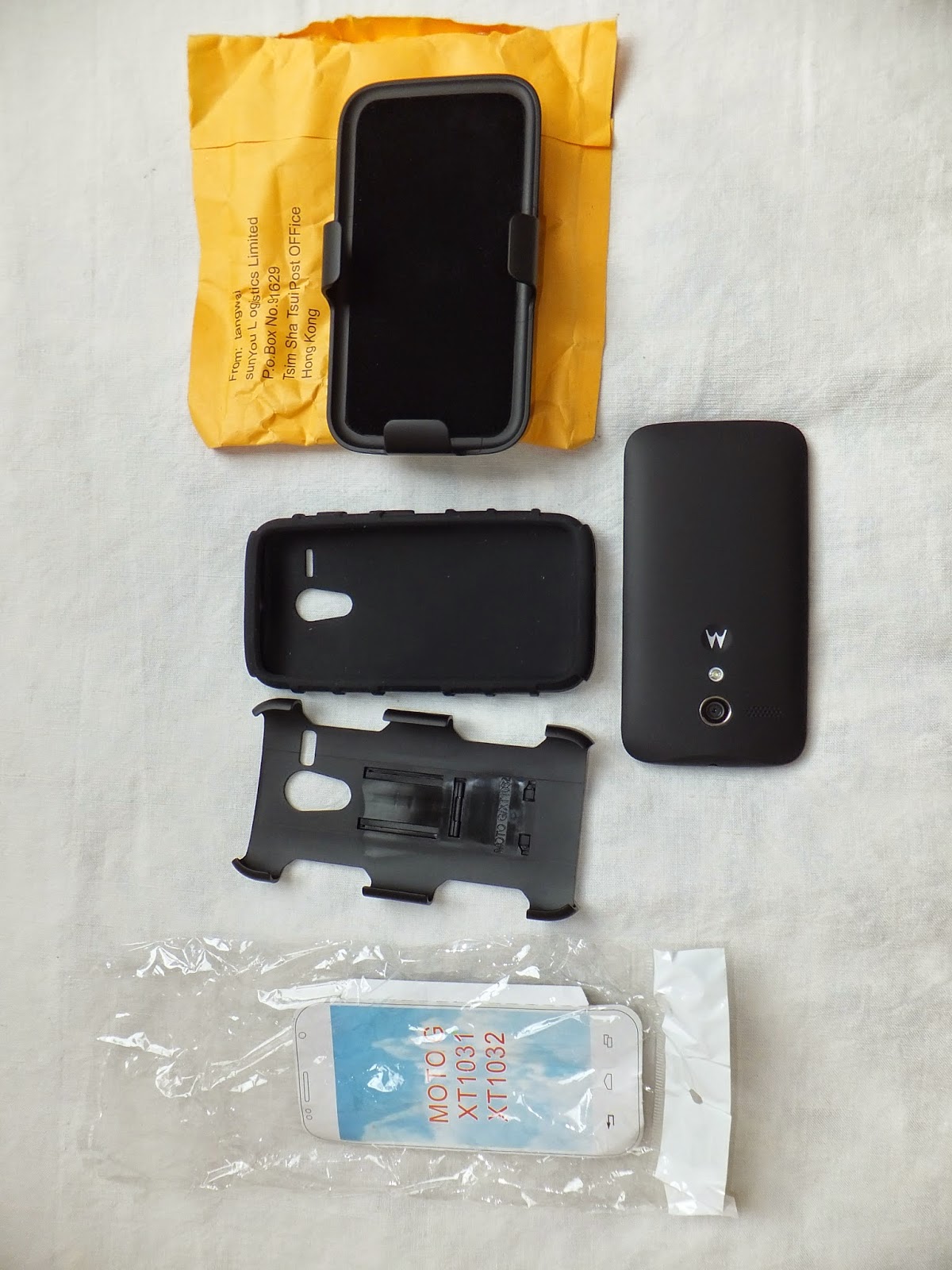
What's in the box ? (device sold separately ofc)
Hybrid armor case for MotoG


<== face up


Hybrid armor case for MotoG


Face down ==> 


The case fits perfectly to the device : 
Hybrid armor case for MotoG


Hybrid armor case for MotoG


Features (useful ones ... or not : depends on you needs) :
The belt clip & the kickstand
The belt clip can be rotated by 180°, and can be use as a kickstand thanks to a small piece
Hybrid armor case for MotoG

Hybrid armor case for MotoG

(on the picture above, i had already removed the clip so the small part on the right is the piece that locks the cover and the clip together : i could be easy to re-assemble when needed)


Hybrid armor case for MotoG


buttons and holes : 
Hybrid armor case for MotoG

Hybrid armor case for MotoG

Hybrid armor case for MotoG

Hybrid armor case for MotoG

in hand : (you can see the embedded kickstand in the middle)
Hybrid armor case for MotoG

Pros: 

  • Fits perfectly the device (which is linked to first 'con')
  • The power and vol up/down buttons are well protected and still can be easily accessed
  • Looks like it will correctly protect the device from falls
  • Cheap (5$), but with a good quality feeling
  • Belt clip that is well made and modular (quite easy to remove)
  • The 2 microphones holes and the 3.5 hole are correctly placed and well sized
  • Good grip in hand

Cons: 

  • The Case is quite difficult to place on the device and need some time to do it properly ! (make sure the vol up/down and power buttons are well placed before clipsing the hard plastic piece.
  • The case with the cover/belt clip is far too thick for me, since i only wanted to keep that cover to protect the screen i removed the belt clip.
  • The device feels really heavy and bulky (but that also gives the 'good quality' feeling).
  • Case embedded kickstand isn't really working (not centered enough to be stable).
  • Cover Belt clip can be used as a kickstand too, but i don't see the use ...
  • Dust sticks a lot on the rubber piece.
  • the hole for µUSB port is a little too small for Motorola's original cable or my Sony, but i'll try to find a cable with a smaller male port. It doesn't matter that much : that's rubber : it just needs to be forced a little to plug and it will get it's place back after charging complete
  • There is a very little flaw in the rubber piece : 
Hybrid armor case for MotoG
Modifications:

  • Removed belt clip from the case cover to reduce thickness, and added an old bios sticker that i had under the hand :
    Hybrid armor case for MotoG

  • Finnally, i didn't kept that 'bios' sticker and put a glow-in-the-dark plastic piece instead: 
Hybrid armor case for MotoG

Hybrid armor case for MotoG


If you want to find it, it is available under different names on ebay : 
  • Hybrid Kickstand Armor Impact Hard Holster Case Cover
  • Future Armor Belt Clip Holster Kickstand Combo Case
  • black rugged rubber tank case cover stand belt clip holster
  • Hybrid Advanced Car Armor Case with Kickstand
[...]
  • and many more ... '-_-

Thursday, June 12, 2014

Installing Manjaro on a ASUS 1011PX netbook


Installing Manjaro Linux on a ASUS 1011PX netbook


If install process itself is quite easy thanks to a noob-proof installer, setting up power saving is more difficult (for an Arch noob as i am) : here is what i found that could fit to my specific needs.


First simply follow Optimized power settings explained in Manjaro's wiki :

- install 3.14.x kernel
- enabling Intel Microcode
- adding some advanced flags to grub : 
pcie_aspm=force acpi_osi=Linux acpi=force acpi_enforce_resources=lax i915.i915_enable_rc6=1 i915.i915_enable_fbc=1 i915.lvds_downclock=1 i915.semaphores=1

- installing TLP (more about TLP) [Don't forget to remove laptop-mode-tools first!]
- installing Linux Thermal Daemon


Then add a few optimizations to TLP : 
the ASUS 1011PX has an Atom n570 @1.66GHz
(available freq : 1667000, 1333000, 1000000kHz)

- Change CPU governor : 
CPU_SCALING_GOVERNOR_ON_AC=ondemand
CPU_SCALING_GOVERNOR_ON_BAT=conservative
(Atom CPU are really too slow using powersave governor [CPU will be stuck @1.0GHz]

- enable MAX freq (keeping default for min : don't uncomment the line):
#CPU_SCALING_MIN_FREQ_ON_AC=0
CPU_SCALING_MAX_FREQ_ON_AC=1667000
#CPU_SCALING_MIN_FREQ_ON_BAT=0

CPU_SCALING_MAX_FREQ_ON_BAT=1333000
(to save a little more juice so that conservative governor will only switch between 1.0 and 1.33GHz when on battery)

I didn't touched the other settings yet.


To see if TLP is doing is job : 
enter the following in terminal (once on AC, once on battery):
sudo tlp-stat | grep cpu